TIPS - How to create a case study

Transform your teaching with
AUNEGE invites its members to use this conversational artificial intelligence tool designed for instructors to dynamic the case method.
Process :
Step 1 :
A user granted with topic creator privileges will have access to the "Create a new topic" button. The fields to complete are explained through examples that creators can reuse and customize for their own case study.Designing a conversation topic consists of defining:
- precisely the characteristics of the virtual interlocutor (the role that the artificial intelligence must play)
- the instructions given to the students (who cannot see the virtual interlocutor characteristics defined above)
Step 2 :
Each topic is automatically assigned a topic key that the teacher can modify and share with students so they can create a conversation.Multiple conversations can be created from the same topic: one conversation per student for individual assignments, or one conversation per team for group projects.
Step 3 :
Each conversation is assigned a conversation key. This is only useful in the context of group projects. It allows students from the same team to join the ongoing conversation.Get Assistance
Would you like assistance in creating a topic? Click the "Create a new conversation with a key" button, use the key AssistantCreation, and let TIPSY guide you.Suppose DUPONT and DURAND are 2 students who must work as a team. DUPONT uses the topic key provided by the instructor to initialize a conversation. He starts chatting with the virtual persona and shares the generated conversation key with DURAND. Shortly after, DURAND inputs this conversation key and can seamlessly continue the dialogue with the virtual avatar. DUPONT, DURAND, and even the instructor who created the topic can view the entire message log and continue interacting with the virtual character.
Simplified representation of TIPS data structure :
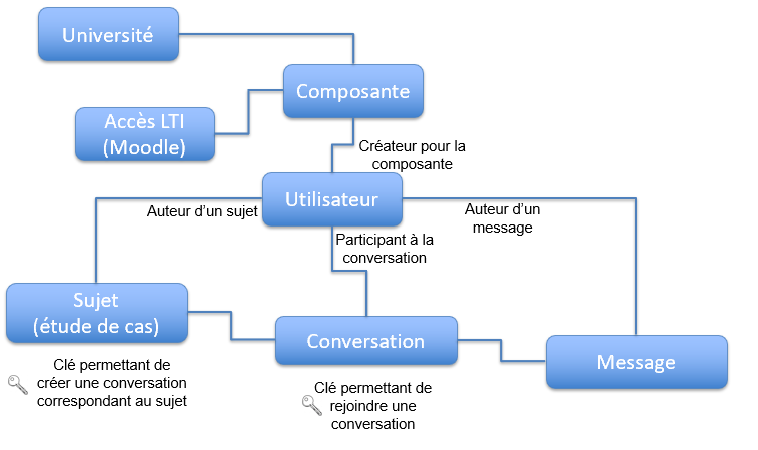
Simplified data model
The virtual persona properties along with the conversation logs are transmitted via API to a generative AI infrastructure, which computes the virtual character's reply. This answer is saved inside the application and delivered back to the student's user interface.
Student Mentoring Support :
Advanced Feature: Adding pedagogical feedback tailored for students
The topic creator can append custom feedback instructions for students within a targeted conversation log.The teacher can either type the advice text directly or request automated AI analysis assistance.
An automated prompt template is compiled including:
- the instructions shared with students,
- the character persona definition rules assigned to the AI avatar,
- the full dialogue message log exchanged during the session,
- a target analytical evaluation angle for the AI (e.g., did the student perform appropriately as a consultant?).
This prompt wrapper remains fully editable. Once triggered, the AI-generated tips are displayed and can be edited before final validation.
Approved tips are highlighted inline within the student's chat feed on a yellow background element.
Example of AI-generated feedback tailored for students:
Students did not fully step into their professional roles as expert advisors to the virtual entrepreneur, Pierre, when analyzing his operational requirements and formulating technical recommendations for digital transformation. Instead, they heavily relied on Pierre's structured descriptions without asking enough analytical or specific follow-up questions to drill down into deeper operational challenges.
Tips to improve their interaction workflows:
- Ask Specific Open-Ended Questions : Instead of leaning on broad general questions, students should practice open questions that prompt Pierre to elaborate. For instance, inquiring about the root cause of a technical block or its bottom-line impact on the corporation will uncover valuable subtext.
- Active Listening and Information Validation : Students should avoid simply reading Pierre's statements. They must actively validate their understanding. Reformulating his answers and requesting formal clarification highlights proper active stakeholder management workflows.
- Propose Concrete, Need-Driven Solutions : As Pierre outlines pain points, students should formulate concrete system management or digital transformation suggestions based on their curriculum, rather than waiting for Pierre to layout the solution requirements himself.
- Deploy Structured Action Plans : Learners should draft clear execution roadmaps based on Pierre's constraints, detailing practical phases for digital implementation. This structures the dialogue workflow and demonstrates high-level strategic reasoning.
- Leverage Contextual Scenarios and Case Proofs : To increase conversation depth, students can reference successful digital deployment case proofs from comparable industries, asking Pierre for his feedback regarding similar technical implementations.
- Refer to Subject Matter Experts : If students hit technical curriculum boundaries, suggesting that Pierre loops in dedicated digital transformation or supply chain procurement experts demonstrates mature self-awareness regarding consulting scope limitations.
By embedding these core consulting strategies, students will optimize their instructional roles as strategic advisors, lighting a clear operational path for Pierre's digital transformation journey.